Multi-Project Hosting Setup on Hetzner
A few months ago, I found myself growing frustrated with managing multiple hosting platforms for my various web projects. Between Telegram bots, Discord bots, websites, landing pages, and self-hosted services, things were getting complicated.
At the same time, I had two major personal projects I wanted to tackle:
First, I needed a way to access my extensive music library remotely. This collection, which I’ve built up over 10-15 years starting with digital downloads in the mid-2000s, was stuck on my desktop PC. While I primarily use Spotify these days for convenience, having remote access to my personal library remained important to me.
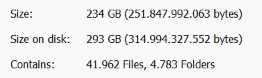
Second, I had an ambitious project involving Lo Zoo di 105, a popular Italian radio show. Since 2006, I’ve collected around 3,000 episodes—approximately 600GB of audio—which I’m now transcribing using OpenAI’s Whisper on my desktop.
My vision was to create a comprehensive online platform for this content, featuring:
- Full audio streaming capabilities
- Text search across transcriptions
- Real-time subtitle display during playback
This project had been a long-time dream, but the transcription costs were previously prohibitive—potentially thousands of euros using traditional services. Thanks to Whisper, I can now process all this audio for free using my desktop GPU.
These requirements called for a robust server solution with substantial storage capacity. After careful research (including consultations with ChatGPT and Claude), I developed this implementation plan:
- Acquire a Dedicated Server from Hetzner – Selected for reliability, affordability, and complete control
- Install Debian (Version 12) – Chosen for its stability and security credentials
- Deploy Virtualmin – To streamline multi-domain management
- Integrate Cloudflare – Providing enterprise-grade DNS, SSL, and caching capabilities
Getting a Dedicated Server from Hetzner
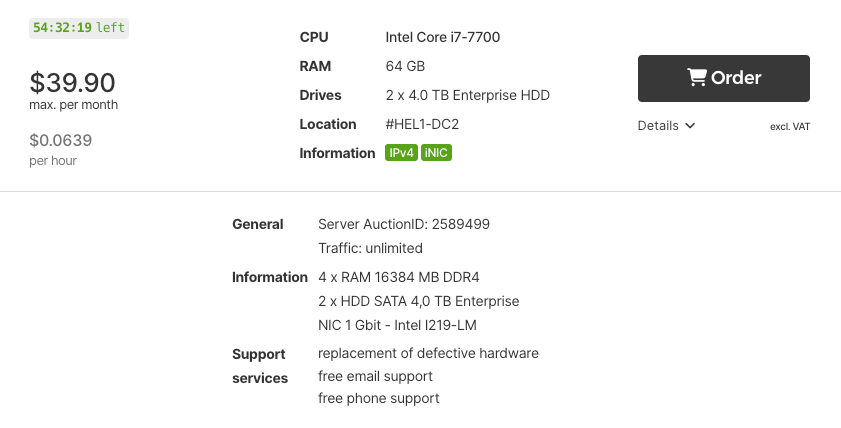
After comparing different hosting providers and their offerings, I decided to go with a dedicated server from Hetzner - specifically their i7-7700 model with 64GB RAM and an 8TB HDD. The choice was driven by my specific needs: I wanted a powerful machine that could handle multiple projects simultaneously while providing ample storage space for media files. The i7 processor offers excellent performance for web hosting and general server tasks, while the 8TB storage ensures I won’t run into space constraints anytime soon.
Initially, I considered using this server for AI/ML workloads as well. However, I quickly realized that without a dedicated GPU, it wouldn’t be practical for running models using Ollama. While the i7-7700 is great for web hosting and general computing tasks, it’s not designed for intensive AI workloads. Hetzner does offer servers with GPUs, but they start at €122/month - a price point that’s difficult to justify for hobby projects. For AI-related tasks, I’ll continue using my desktop PC, which is better equipped with an i7-14700 CPU and RTX 4070 Ti Super GPU.
Here’s what I ended up paying for the server:
After receiving my server credentials, the first step was securing the system. I logged in via SSH and immediately set up SSH key authentication for enhanced security. Then, I performed a complete system update to ensure all packages were up to date. For server management, I wanted a user-friendly graphical interface.
After researching various options and consulting with AI assistants, I determined that Webmin/Virtualmin would be the perfect solution for my needs.
Installing and Configuring Virtualmin
The installation process for Virtualmin was straightforward - I used their official installer script which handles all the necessary dependencies. Once installed, I accessed the web interface through port 10000 and went through the initial configuration. The setup wizard guided me through important settings like email configuration, web server options, and security parameters.
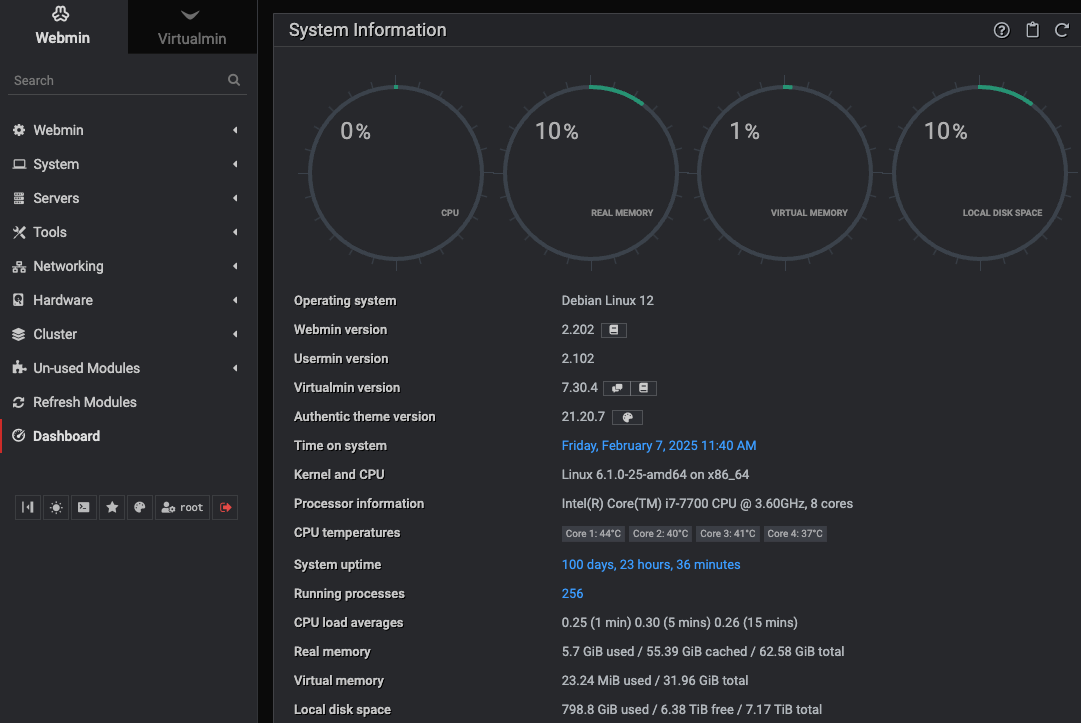
One of the biggest advantages of using Virtualmin is how easy it makes spinning up new subdomains for testing different projects. The interface provides a straightforward way to create new virtual servers, each with its own isolated environment.
For example, when I wanted to experiment with creating a chatbot using Google’s Gemini API, I could quickly:
- Create a new subdomain through Virtualmin’s interface
- Set up a Python virtual environment specific to that project
- Install the required dependencies without worrying about conflicts
- Deploy and test the application in isolation
This modular approach is perfect for experimenting with new ideas or testing different configurations without risking interference with other projects.
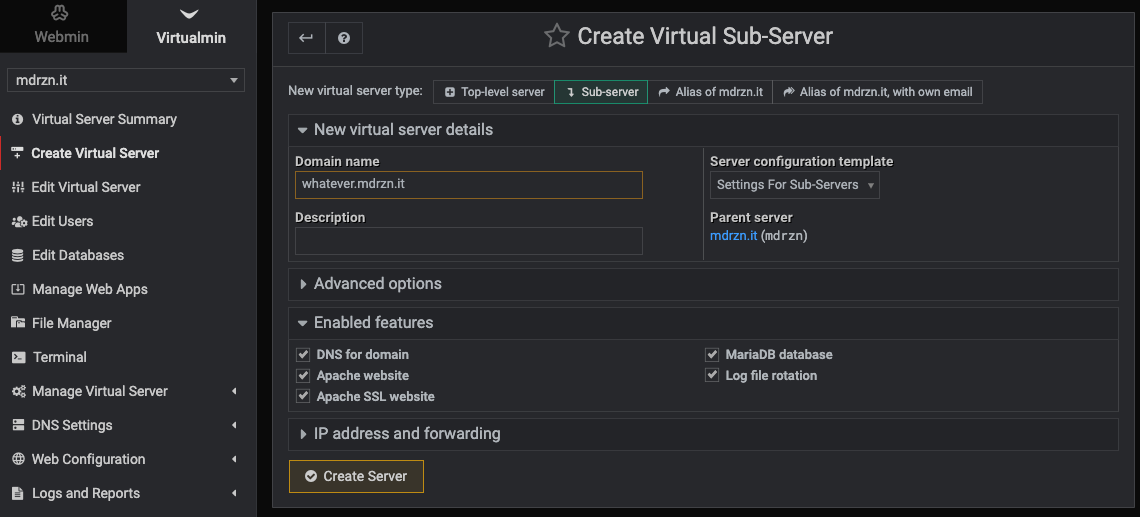
Each virtual server gets its own:
- Web server configuration
- File system space
- Process management
- SSL certificates (automatically handled through Cloudflare)
- Database (if needed)
This isolation means I can freely experiment with different technologies and frameworks without worrying about breaking existing services. If an experiment doesn’t work out, I can simply delete the virtual server and start fresh, keeping my main projects completely unaffected.
Setting Up Cloudflare Integration
Setting up Cloudflare as a reverse proxy was surprisingly simple - it works seamlessly with Virtualmin’s virtual servers out of the box! Once I pointed my domain’s nameservers to Cloudflare, each subdomain automatically resolved to the correct virtual server space. Cloudflare also handles SSL certificates and provides additional security by hiding my server’s IP address behind their network.
Rapid MVP Development with Claude Code
One unexpected benefit of this setup has been how well it pairs with Claude Code for rapid prototyping. With SSH access to the server and Claude Code running locally, I can spin up new projects incredibly fast.
My typical workflow looks like this:
- Create a new subdomain in Virtualmin (takes ~30 seconds)
- SSH into the server and navigate to the new project directory
- Describe the project to Claude Code and let it scaffold the entire application
- Iterate in real-time - Claude can read errors, fix issues, and deploy changes instantly
This approach has allowed me to build and deploy MVPs in hours rather than days. Some examples:
- canvas.mdrzn.it - An AI-powered infinite whiteboard with image generation (React + Express + multiple AI providers)
- translate.mdrzn.it - A translation service
- stats.mdrzn.it - Analytics dashboard
- Screenshot Uploader - Cross-platform tools for seamless screenshot sharing with Claude Code over SSH
The combination of Virtualmin’s easy subdomain management and Claude Code’s ability to write, debug, and deploy code means I can go from idea to working prototype extremely quickly. Each project gets its own isolated environment, so experiments never interfere with production services.
Why This Works So Well
- Immediate feedback loop: Changes deploy instantly, Claude can see errors in real-time
- Full system access: Claude can install dependencies, configure services, set up databases
- Persistent environment: Unlike local development, the server is always on and accessible
- Easy cleanup: If a project doesn’t work out, just delete the virtual server
This has fundamentally changed how I approach side projects. Instead of overthinking architecture and planning, I can just start building and iterate based on what actually works.
Moving Forward
This setup provides exactly what I was looking for: a centralized, secure hosting solution with abundant storage and the flexibility to manage multiple projects efficiently. The infrastructure is now ready to handle various web applications, from simple static sites to more complex applications requiring significant storage and processing power. In the next post, I’ll dive into the details of setting up the Lo Zoo di 105 archive project, including the challenges and solutions involved in creating a searchable audio archive with transcriptions.
← Back to blog